Production Schedules
Your production schedule tells ForgeMRP when your shop is actually open. Every business-day calculation in the app -- quote lead times, job ETAs, the production board -- skips the days you mark as closed, so promised dates stay realistic.
Getting There
Go to Settings > Production Schedules.
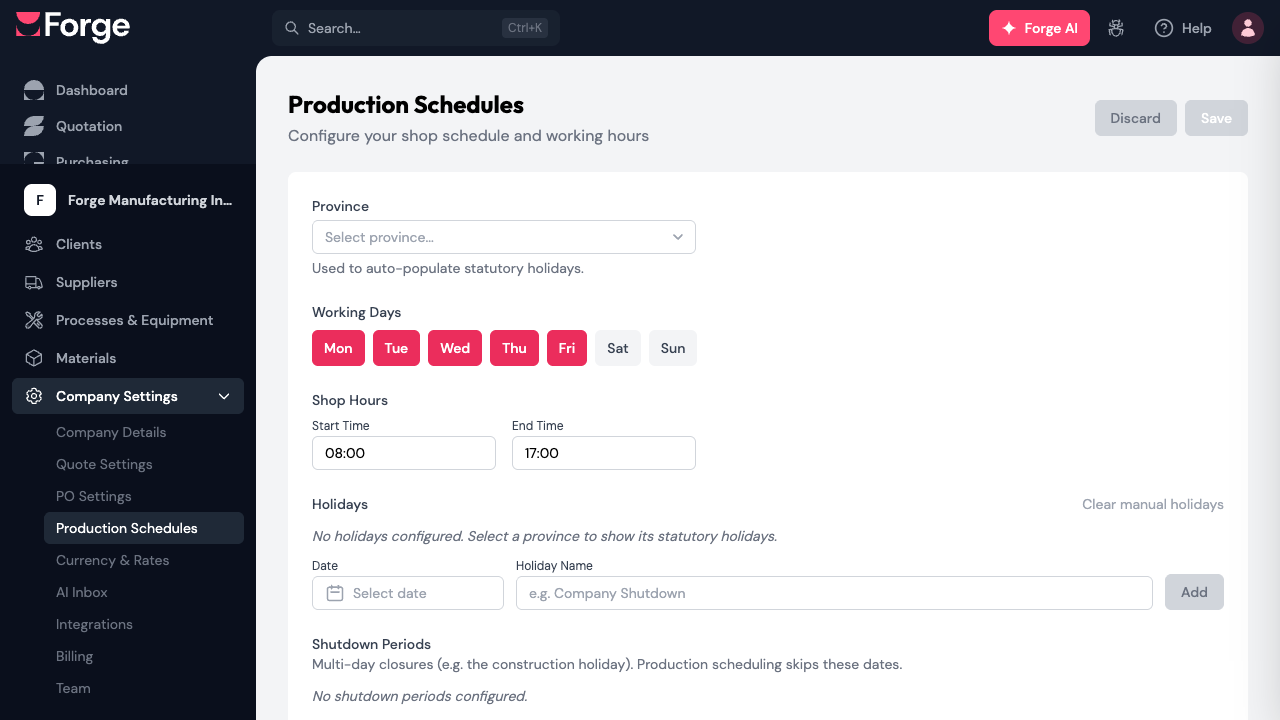
Province
Pick the province your shop operates in. ForgeMRP uses it to fill in that province's statutory holidays automatically, every year -- you never have to re-enter New Year's Day or Canada Day.
If you leave this empty, ForgeMRP falls back to the province from your company address. Automatic holidays show an Automatic badge in the holidays table and can't be deleted; they update themselves each year.
Working Days
Click the day buttons to toggle which days your shop runs. Most shops run Monday to Friday, but if you run Saturdays, add it here and your lead times will count Saturdays as working days.
Shop Hours
Set the start and end of your working day (for example 08:00 to 17:00). The scheduler uses these hours to figure out how much machining fits in a day -- a 12-hour job doesn't finish today if only 4 hours remain before closing. Equipment marked lights-out capable can keep running outside these hours.
Holidays
The holidays table combines two kinds of entries:
- Automatic -- statutory holidays for your province, computed each year. Shown in gray with an Automatic badge.
- Manual -- one-off closures you add yourself (a company shutdown day, a moved holiday). Pick a date, give it a name, and click add. A manual holiday on the same date as a statutory one takes precedence.
Use Clear manual holidays to remove all your manual entries at once; automatic holidays stay.
Shutdown Periods
For multi-day closures -- the construction holiday, a summer shutdown, year-end -- add a shutdown period with a start date, end date, and label. Production scheduling skips every day in the range, so a two-week shutdown pushes ETAs out by two weeks instead of silently promising dates you can't hit.
What the Schedule Affects
- Quote lead times -- the "Promised (business days from PO)" field and the "Earliest" estimate both count only your working days.
- Job ETAs -- projected completion dates skip your holidays and shutdowns.
- Production board -- work orders are scheduled inside your shop hours on your working days.
Supplier lead times are separate: they run on the supplier's own calendar (their province's holidays), not yours.
Don't forget to click Save after making changes -- the page uses explicit save, so nothing is stored until you do.